


OBDocker - OBD2 Car Scanner
4.1288.00 Reviews
App Specs
- Version
- 3.2.6
- Updated On
- License
- Free
- Downloads
- 1,000,000+
- Developer
- Motorsure INC.
- Categories
- Auto & Vehicles
- Platform
- Android, iOS
Screenshots
 Analysis by AppCompare
When several people use the same car, a warning light can turn into a small household mystery: who noticed it, when did it appear, and is it safe to keep driving? I like the idea of using a phone and an OBD2 adapter to get a clearer first look before deciding what to do. OBDocker - OBD2 Car Scanner is built for that sort of hands-on vehicle checking, though it works best when everyone treats its readings as a starting point rather than a final diagnosis.
A shared car needs a shared routine
Picture a family car used for school runs, errands, and commuting. One driver sees the check engine light on the way home; another needs the car the next morning. With an OBD2 scanner available, the person who noticed the light can read the code and pass along the result instead of relying on a vague description. That can make a conversation with a repair shop more focused, too.
The useful habit is to note what happened before scanning: whether the warning is new, whether the car feels different, and under what circumstances the light appeared. A code can point toward an area that needs attention, but it does not automatically identify a failed part. I would share the code and symptoms with the next driver, not simply say that the app cleared the warning and everything is fine.
Set boundaries around the phone and adapter
The app is only one part of the setup. You need a compatible OBD2 adapter that plugs into the vehicle’s diagnostic port, and the phone must connect to that adapter. If more than one person will use the tool, agree on where the adapter is kept and who is responsible for reconnecting or putting it away. That simple routine reduces the chance of someone searching for it just when a warning appears.
It also helps to keep the phone pairing and vehicle profile choices deliberate. A shared phone may be convenient for a household, but the person operating the app should know which car is connected and avoid assuming that a reading belongs to another vehicle. Multiple vehicle profiles are useful when the household has more than one car; still, checking the selected profile before interpreting a result is a sensible safeguard.
For a first scan, I’d keep the process calm and repeatable: park safely, connect the adapter, confirm the right vehicle, then read and record the result before changing anything. Clearing a code too quickly can remove a useful clue for a mechanic, and a warning that disappears is not proof that the underlying issue has been fixed. Keeping the original code and the circumstances around it is more useful than chasing a clean dashboard.
Coordination matters more than constant checking
OBDocker can help different drivers talk about the same issue using a code or a set of readings rather than guesswork. That is particularly handy when the person who owns the car is not the one who drives it every day. A short note about the date, warning light, and symptoms can add context that a scan alone may not capture.
Worth Reading Before You Choose

Flipboard Shows What News Apps Must Do Beyond the Feed

Switching to Android Auto Means Rethinking Your Driving Routine

Google Calendar Makes a Crowded Week Easier to Manage

Ludo King Makes the Most of the Minutes Between Plans

Baby Panda World Brings Quick Play to Modern Phones, but Its Game Library Feels Busy

ESPN’s Live Game View Makes Following Close Games Easier
I would not turn routine driving into a group monitoring project. Pick one person to handle scans and share findings when there is a reason, such as a warning light or a planned maintenance discussion. That keeps the tool useful without making every driver feel responsible for interpreting engine data. The app’s logging and profiles can support an organized approach, but the household still needs to decide how it will communicate what matters.
Age, trust, and sensible expectations
The app is rated for Everyone, but that is not the same as saying every age group should interpret vehicle diagnostics alone. An adult should guide younger or inexperienced users through connecting an adapter and deciding what a code means. The main risk is overconfidence: an app can make technical information easier to access, but it cannot replace a mechanic’s inspection or judgment.
Motorsure INC. makes this free Auto & Vehicles app, which has a 4.3 average from around 34,000 ratings and more than 1 million installs. It was released on December 1, 2023, and version 3.2.6 is the current version. Optional in-app purchases range from $0.99 to $119.99 per item, so I’d check the purchase details before committing to anything beyond the free app. The minimum operating system is Android 7.0.
That combination makes it approachable for a household curious about basic diagnostics, but not necessarily the best fit for someone who expects a phone to replace a repair shop. It is also not a stand-alone scanner: you need the adapter, and results depend on the vehicle information available through the connection. If you mainly want a quick professional assessment, booking a mechanic is simpler. If you want to understand a warning before that visit, a scanner app can be a useful companion.
First Impressions and Setup
Installing OBDocker - OBD2 Car Scanner is a breeze. Just head over to your app store, download, and you’re good to go. The first thing that caught my eye was its neat interface. It’s clean, intuitive, and doesn’t overwhelm you with too many buttons or options. This is perfect for folks who might not be super tech-savvy but want to keep an eye on their car’s health.
Setting it up is straightforward. You’ll need an OBD2 adapter, which plugs into your car’s OBD port. Connect the adapter to your phone via Bluetooth, and the app takes care of the rest. I found it really simple to pair, and the app guides you through the process with easy-to-follow instructions.
Features That Stand Out
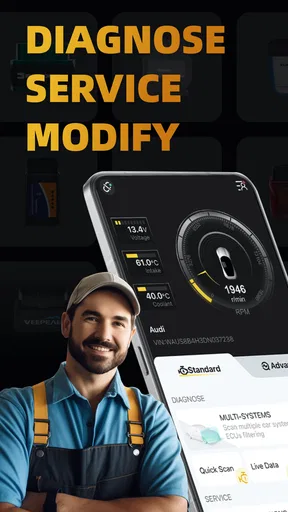
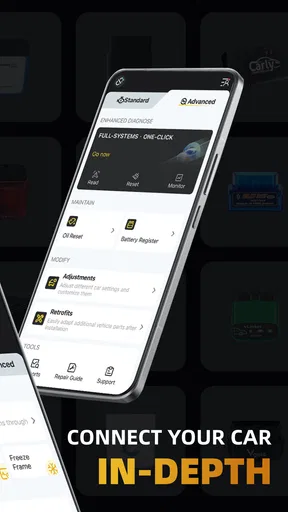
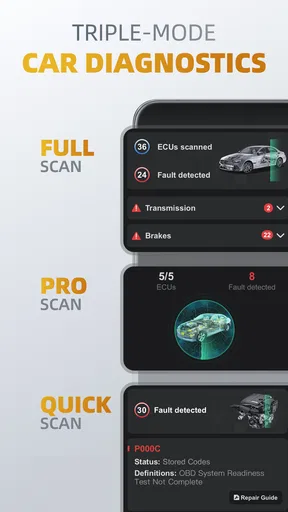
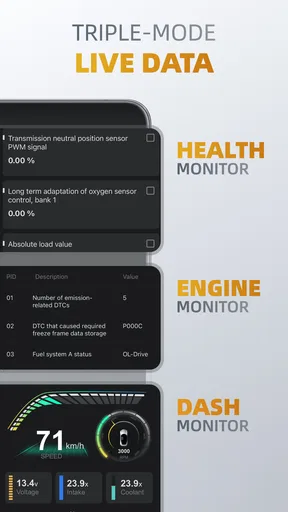
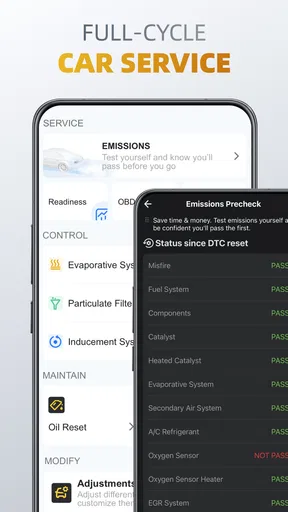
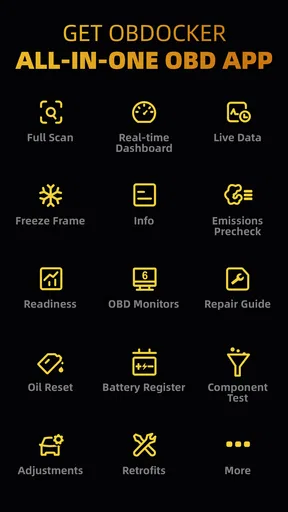
Once you're connected, the real fun begins. The app offers a plethora of features that cater to both beginners and seasoned car enthusiasts. You can read diagnostic trouble codes (DTCs) and get real-time data from your car’s onboard systems. If you’re like me and love knowing the nitty-gritty details, you’ll appreciate the depth of information available.
One of my favorite features is the ability to clear trouble codes. It’s a game-changer when the check engine light comes on, and you’re left wondering what’s wrong. With a few taps, the app identifies the issue, and you can even clear the codes if it’s something minor. Of course, if it’s something serious, always consult a professional.
Performance and Usability
In terms of performance, the app is pretty solid. The data refreshes quickly, and I didn’t experience any lag or crashes during my use. It’s reliable, which is crucial when you’re depending on it for important vehicle information.
As for usability, I appreciate the app’s layout. It’s designed to be user-friendly, with features neatly categorized, so you’re not fumbling around trying to find what you need. Whether you want to check your vehicle’s speed, fuel usage, or engine RPM, it’s all just a tap away.
Additional Perks
Beyond the basics, OBDocker - OBD2 Car Scanner offers some nifty extras. The app supports multiple vehicle profiles, which is a plus if you’re managing more than one car. It also provides extensive data logging, so you can track your car’s performance over time.
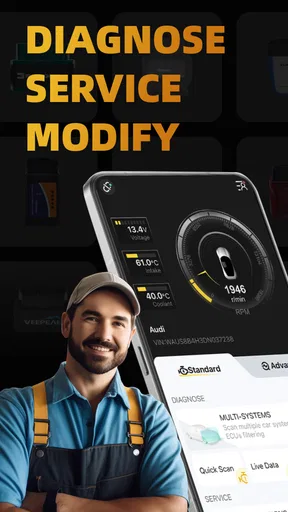
Another cool feature is the customizable dashboard. You can set it up just the way you like, displaying only the metrics that matter most to you. It’s like having a personal car dashboard tailored to your preferences.
What the readings are good for
For everyday use, I’d treat the live data as a way to notice patterns rather than a set of targets to obsess over. For example, if a car feels sluggish, checking engine RPM or speed while parked or during a safe, ordinary drive may help you describe the symptom more precisely. The driver should keep attention on the road; a passenger can monitor readings, or the check can wait until the car is stopped.
Logs are most useful when they answer a specific question. Before a longer trip, you might note a baseline reading or review a change you have already noticed, then compare it later under similar conditions. A single number without context can be misleading, so I would avoid drawing conclusions from readings taken at different speeds, loads, or stages of a drive. The dashboard’s customization helps keep the handful of relevant metrics visible instead of turning a scan into a wall of figures.
Compared with a basic code reader, a phone-based app can make it easier to view live information, organize vehicles, and keep a record over time. Compared with a mechanic’s diagnostic equipment, though, it is a lighter tool intended for owner-level checks, not a substitute for a complete inspection. That distinction is important: a code may narrow down where to investigate, but it does not prove which component is at fault or whether the car is safe to drive.
Where the convenience has limits
The adapter is an extra item to buy or already own, and Bluetooth pairing adds a step that a dedicated handheld reader may avoid. If you only need to check a warning once, a repair shop may be the more practical choice. On the other hand, drivers who like to learn about their vehicles may find the combination of codes, real-time data, profiles, and logging more useful than a reader that only shows a basic fault message.
There is also a judgment call around clearing a code. If the issue was genuinely minor and has been addressed, clearing may be reasonable, but I would first save the code and note any symptoms. If the warning returns, the car runs poorly, or the issue affects safe operation, stop treating the phone as the answer and get qualified help. The ability to clear a warning is convenient; it is not a repair function.
In short, I’d recommend this app to drivers who are willing to pair it with an OBD2 adapter, learn what the readings can and cannot tell them, and use the information to make better decisions. It suits a shared household car especially well when one person takes responsibility for keeping useful notes and communicating them. If you want a guaranteed diagnosis, dislike handling vehicle data, or need a tool that works without an adapter and setup, this is not the right option.
Final Thoughts
If you’re into cars, or just want a little more control and insight into what’s happening with your vehicle, OBDocker - OBD2 Car Scanner is a fantastic tool. It’s user-friendly, packed with features, and doesn’t require you to be a tech genius to operate.
Of course, it’s always wise to keep in mind that while the app is a powerful diagnostic tool, it’s not a substitute for professional maintenance. But for everyday monitoring and troubleshooting, it’s like having a mechanic’s insight right in your pocket.
So, next time you see that pesky check engine light, you’ll be ready. Give it a try and see for yourself. Happy driving!
Pros
- Easy to use interface for beginners.
- Supports multiple car models and makes.
- Real-time data monitoring available.
- No extra hardware required for basic use.
- Frequent updates enhance functionality.
Cons
- Limited features in free version.
- Advanced diagnostics need premium.
- Requires Bluetooth for connectivity.
- May not support older car models.
- Battery usage is relatively high.
FAQs for OBDocker - OBD2 Car Scanner
What is OBDocker - OBD2 Car Scanner and how does it work?
OBDocker - OBD2 Car Scanner is a diagnostic tool app designed to connect to your vehicle's OBD2 port using a compatible Bluetooth adapter. It allows users to read and clear error codes, monitor real-time vehicle data, and perform diagnostics. This app provides valuable insights into your car’s performance and potential issues, making it a handy tool for both DIY enthusiasts and professional mechanics.
Is OBDocker compatible with all vehicles and OBD2 adapters?
While OBDocker is compatible with most vehicles manufactured after 1996, it’s important to check your vehicle’s compatibility with the app. Additionally, not all Bluetooth adapters may work seamlessly with the app. It is recommended to use popular and widely supported adapters like ELM327 for the best experience. Always verify compatibility before purchasing an adapter.
What features does OBDocker offer to users?
OBDocker offers a range of features including reading and clearing diagnostic trouble codes, real-time data monitoring, and fuel efficiency tracking. It also provides detailed reports and graphs that help users understand vehicle performance. The app’s user-friendly interface ensures that even beginners can navigate and utilize its features effectively.
Do I need technical knowledge to use OBDocker effectively?
You don't need extensive technical knowledge to use OBDocker, as it is designed to be user-friendly. The app provides clear instructions and explanations for each feature. However, a basic understanding of vehicle systems can enhance your experience, especially when interpreting diagnostic codes and data readings.
Are there any subscription fees or in-app purchases in OBDocker?
OBDocker offers a free version with basic features, but for advanced functionalities, users might need to purchase a subscription or unlock specific features via in-app purchases. This payment model allows users to try out the app before deciding on any additional purchases, ensuring they only pay for features they find useful.


